Monitors
Path: Left sidebar > Infrastructure > Monitors
Monitor Overview
The Cluster Monitors page shows the health and status of all Ceph Monitor (MON) daemons. Monitors maintain the cluster map - the authoritative record of cluster topology, OSD states, and PG mappings.
What You See
The Monitors page is split into three panels:
Status (left)
In Quorum (right top)
Not In Quorum (right bottom)
Purpose:
To verify monitor quorum before performing storage operations.
To confirm the control-plane state is stable.
When to Use:
Before creating or changing pools, file systems, or block/object resources.
During any alert about monitor health or quorum.
Steps:
Open
Infrastructure > Monitors.Check
In Quorumpanel. All deployed monitors should appear here.Check
Not In Quorumpanel. Healthy state showsAll monitors are in quorum..Check
Statuspanel quorum field and confirm expected monitor count.
Expected Outcome:
You confirm whether quorum is healthy and the cluster can safely accept writes.
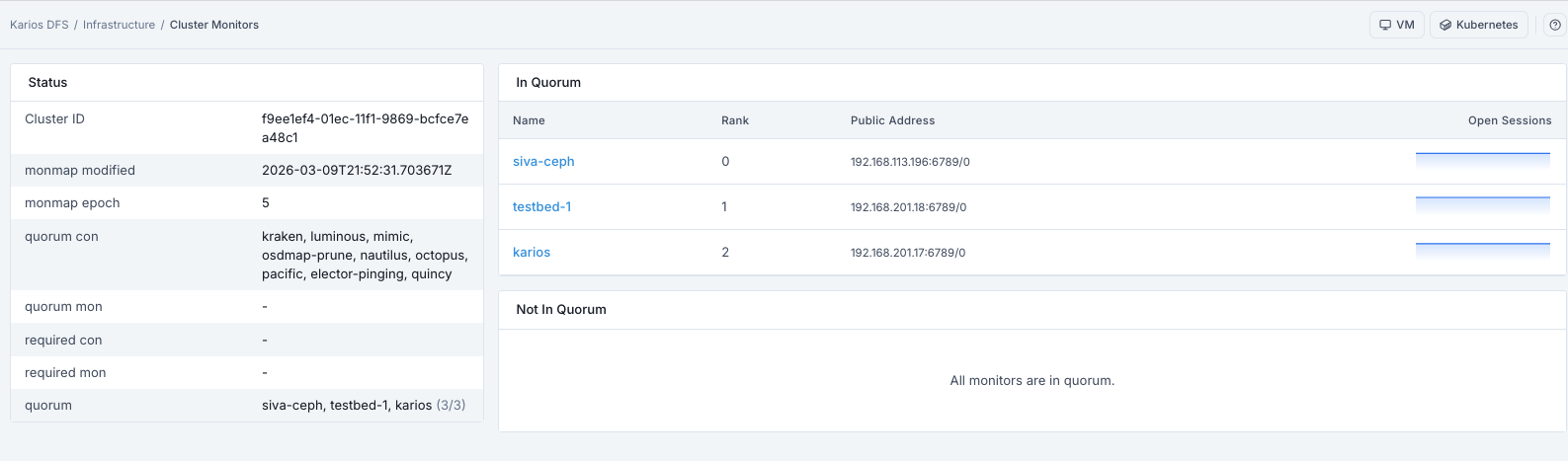
What This Screenshot Shows: Monitors Dashboard (UI Reference; Values Depend On Your Environment).
Status Panel - Field Reference
Field |
What It Shows |
|---|---|
Cluster ID |
Unique cluster FSID shared by all daemons |
monmap modified |
Timestamp of last monitor map change |
monmap epoch |
Monitor map version number (increments on map changes) |
quorum con |
Quorum-supported connection feature set |
quorum mon |
Reserved field (often |
required con |
Required connection feature set (often |
required mon |
Required monitor feature set (often |
quorum |
Monitor names currently in quorum with count |
In Quorum Panel - Column Reference
Column |
What It Shows |
|---|---|
Name |
Monitor daemon identifier (for example |
Rank |
Numeric rank assigned during election. The leader holds Rank 0. |
Public Address |
IP address and port this monitor is listening on |
Open Sessions |
Number of currently open client sessions on this monitor |
Tip
Rank 0 is the current leader monitor coordinating map updates and elections. Frequent leadership changes can indicate monitor network instability.
Tip
Open Sessions indicates active monitor client connections. Temporary variation is normal; sustained imbalance can indicate client routing or host-level issues.
Monitor Roles Reference
Role |
Meaning |
|---|---|
Leader |
The primary monitor that coordinates map updates and elections |
Peon |
A follower monitor that participates in quorum but defers to the leader |
Probing |
A monitor attempting to establish quorum - not yet fully connected |
Quorum
The cluster requires a majority of monitors to form quorum before it can accept client I/O.
For a 3-monitor deployment, at least 2 must be in quorum.
For a 5-monitor deployment, at least 3 must be in quorum.
Warning
If quorum is lost, the cluster will stop accepting writes. Restore monitor connectivity immediately.
Expanded Row Details
Field |
Description |
|---|---|
FSID |
The unique cluster identifier. All daemons in the cluster share the same FSID. |
Election Epoch |
Increments on every leader election. Frequent elections indicate network or latency issues between monitors. |
Map Epoch |
The current version of the monitor map. |
Features |
Ceph feature flags supported by this monitor daemon version. |
Warning
Rapidly increasing election-related counters indicate unstable monitor connectivity. Validate monitor network latency and time synchronization.
CLI Diagnostic Context
The CLI commands in the Common Issues table are optional diagnostics for administrators.
Before running them:
SSH to the monitor host.
Use an account with sudo/administrative privileges.
Keep UI workflow as primary path for normal operations.
If this fails
Symptom |
Likely Cause |
Action |
|---|---|---|
Monitor not in quorum |
Network partition or daemon crash |
Check |
Leader election loop |
Clock skew between hosts |
Sync NTP on all monitor hosts |
1 of 3 monitors missing |
Host unreachable |
Restore host or replace monitor |
Cluster is not accepting writes |
Quorum lost (below majority) |
Restore connectivity until quorum majority is re-established |
Note
Operational note: Deploy monitors on an odd number of dedicated hosts (3 or 5) with synchronized clocks and low-latency network connections.
Note
If any issue persists, raise a support ticket via Monitoring > Alerts or
Karios Support.