Observability
Where This Fits in Karios
Karios is the unified infrastructure platform described in
Getting Started. Observability is the
evidence and diagnostics layer inside Control Center, used to correlate events,
alerts, dependency health, and support data across the rest of the platform.
If you landed here directly, use Glossary for shared terms and keep Getting Started as the platform-level reference.
        flowchart LR
    Ops[Operator] --> Obs[Observability<br/>Control Center]
    Obs --> E[Events]
    Obs --> A[Alerts]
    Obs --> D[Diagnostics]
    Obs --> SB[Support Bundle]
What Observability Is
Observability is the operational evidence layer in Control Center. It combines activity history, active alerting, dependency diagnostics, and support-bundle collection.
Purpose
Use this section to monitor activity, review alerts, investigate health issues, and generate support evidence.
Note
RBAC access varies by role. Confirm with your administrator that your account has permission to view the Observability section.
Observability Subsections
Under Observability in the left navigation, this section includes the
following modules:
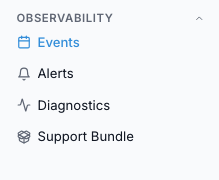
Observability navigation in the Control Center sidebar.
Step: Start Observability Workflow
When to Use:
Use this before opening individual Observability modules.
Purpose:
Establish a consistent workflow across Events, Alerts, Diagnostics, and Support Bundle.
Steps:
Open
Control Center -> Observability -> Eventsand review recent failed actions.Open
Control Center -> Observability -> Alertsand prioritize active high-risk items.Open
Control Center -> Observability -> Diagnosticsand collect dependency evidence for unresolved issues.Open
Control Center -> Observability -> Support Bundleand generate a bundle when escalation evidence is required.
Tip
Use Events for timeline context, Alerts for active risk, and Diagnostics for dependency verification. Use Support Bundle for escalation evidence.
Warning
Do not conclude root cause from one page only; correlate signals across Events, Alerts, and Diagnostics.
Expected Outcome:
You can identify what happened, what is currently at risk, and what evidence is needed for remediation or escalation.
If this fails:
Recheck active filters and time window in each module.
Open the module help panel for field definitions.
→ Next: K-Shield (Security)