Compute Policies Overview
Where This Fits in Karios
Karios is the unified infrastructure platform described in
Getting Started. Compute Policies are the
reusable control objects used by VM, Kubernetes, and storage-adjacent workflows
to standardize sizing, placement, access, and first-boot behavior.
If you landed here directly, use Glossary for shared terms and keep Getting Started as the platform-level reference.
What Compute Policies Are
Compute Policies define reusable guardrails for VM sizing, storage profile selection, placement constraints, SSH access keys, TLS certificates, and VM bootstrap data.
What This Section Includes
Use the module that matches the policy object you need to review or manage.
Module |
Use it to manage |
|---|---|
VM CPU, memory, storage behavior, and optional GPU defaults. |
|
Reusable volume sizing and storage placement settings. |
|
VM placement preferences and separation rules. |
|
Public keys used for VM access. |
|
First-boot initialization scripts and cloud-init style data. |
|
Certificates used by workloads and platform integrations. |
Open Compute Policies in Control Center
In Control Center, expand Compute Policies in the left navigation and
open the module that matches your task.
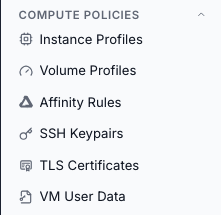
Compute Policies navigation.
Expected Outcome:
You can navigate to the correct Compute Policies module.
If this fails:
Refresh the UI and confirm navigation state is expanded.
Confirm
Compute Policiesis expanded in the left navigation.Review the on-screen error message and retry.
→ Next: Observability