Platform Authentication
Platform Authentication controls how operators sign in to the main Karios
login and how their directory groups map to Karios roles. You reach it at
Platform Config -> Authentication.
One sign-in method is active at a time. Local admin login always works as a break-glass fallback, so you are never locked out, even while an external method is active or misconfigured.
flowchart LR
U[Operator] --> L["Karios login<br/>https://<node>/login"]
L --> M{Active method}
M -->|Local| DB[(Karios database)]
M -->|AD / LDAP| DIR[Directory server]
M -->|SAML / OIDC| IDP[Identity provider]
DIR --> G[Group to role mapping]
IDP --> G
G --> S[Signed in with roles]
Login methods
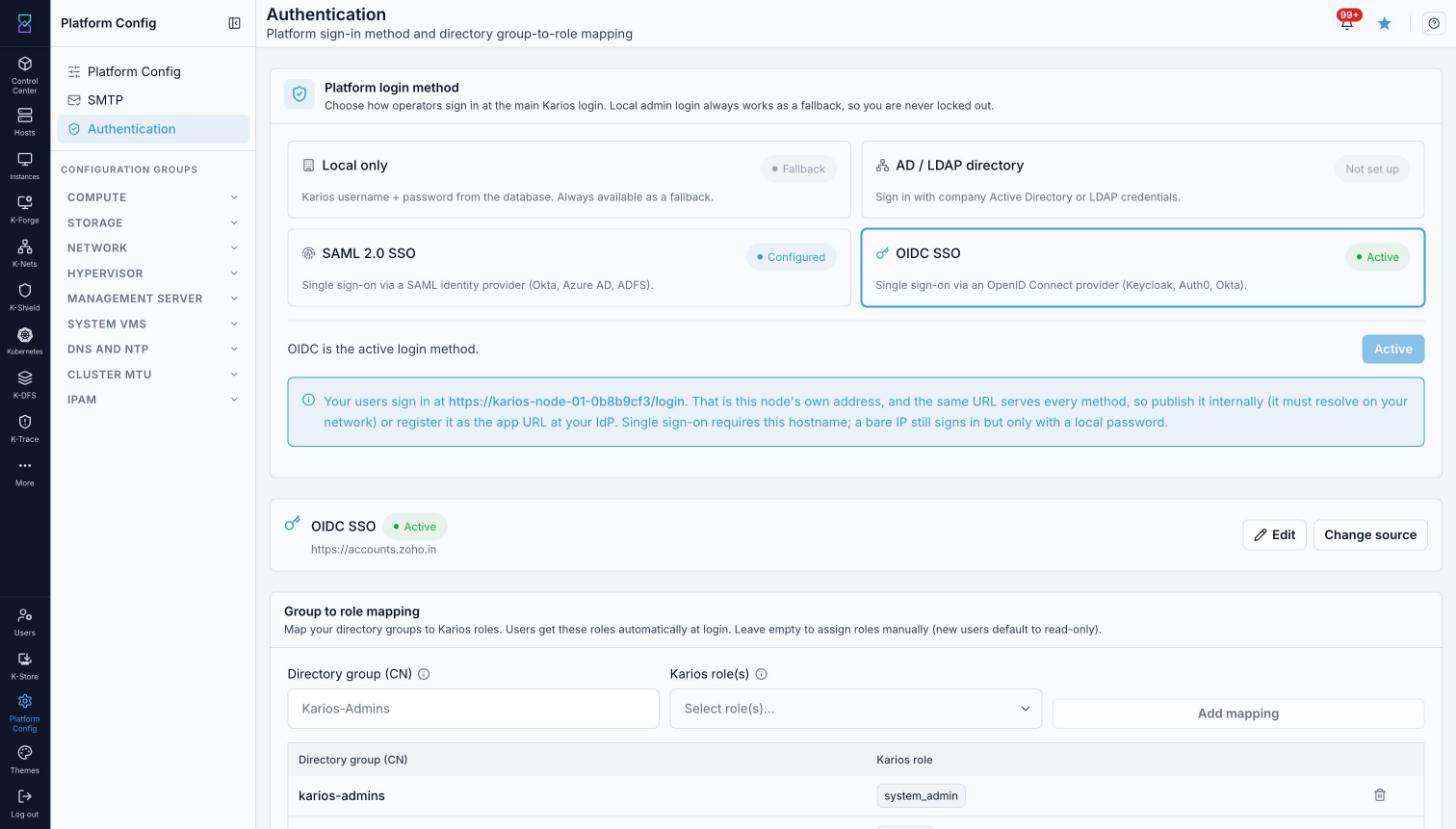
The Authentication page. The active method is highlighted; the others are available to configure and switch to.
Method |
State label |
Use it for |
|---|---|---|
Local only |
Fallback |
Karios username + password stored in the database. Always available as a break-glass fallback and cannot be turned off. |
AD / LDAP directory |
Not set up / Active |
Operators sign in with their company Active Directory or LDAP credentials. |
SAML 2.0 SSO |
Configured / Active |
Single sign-on via a SAML identity provider (Okta, Azure AD, ADFS). |
OIDC SSO |
Configured / Active |
Single sign-on via an OpenID Connect provider (Keycloak, Auth0, Okta). |
The sign-in URL
Operators sign in at https://<node-hostname>/login. The same URL serves
every method, so it must resolve on your network, or be registered as the
application URL at your identity provider.
Important
Single sign-on (SAML and OIDC) requires this hostname. A bare IP address still signs in, but only with a local password - the IdP redirect will not complete against an IP.
AD / LDAP directory
When AD / LDAP is the active method, Karios verifies each operator against your directory at sign-in and never stores their password. The local admin login remains as a break-glass fallback.
What you will need
A directory server URL (
ldap://orldaps://)Your Base DN, for example
dc=company,dc=comA read-only bind (service) account and its password
Configuration fields
Select AD / LDAP directory, acknowledge that Karios authenticates against your directory, then complete the form.
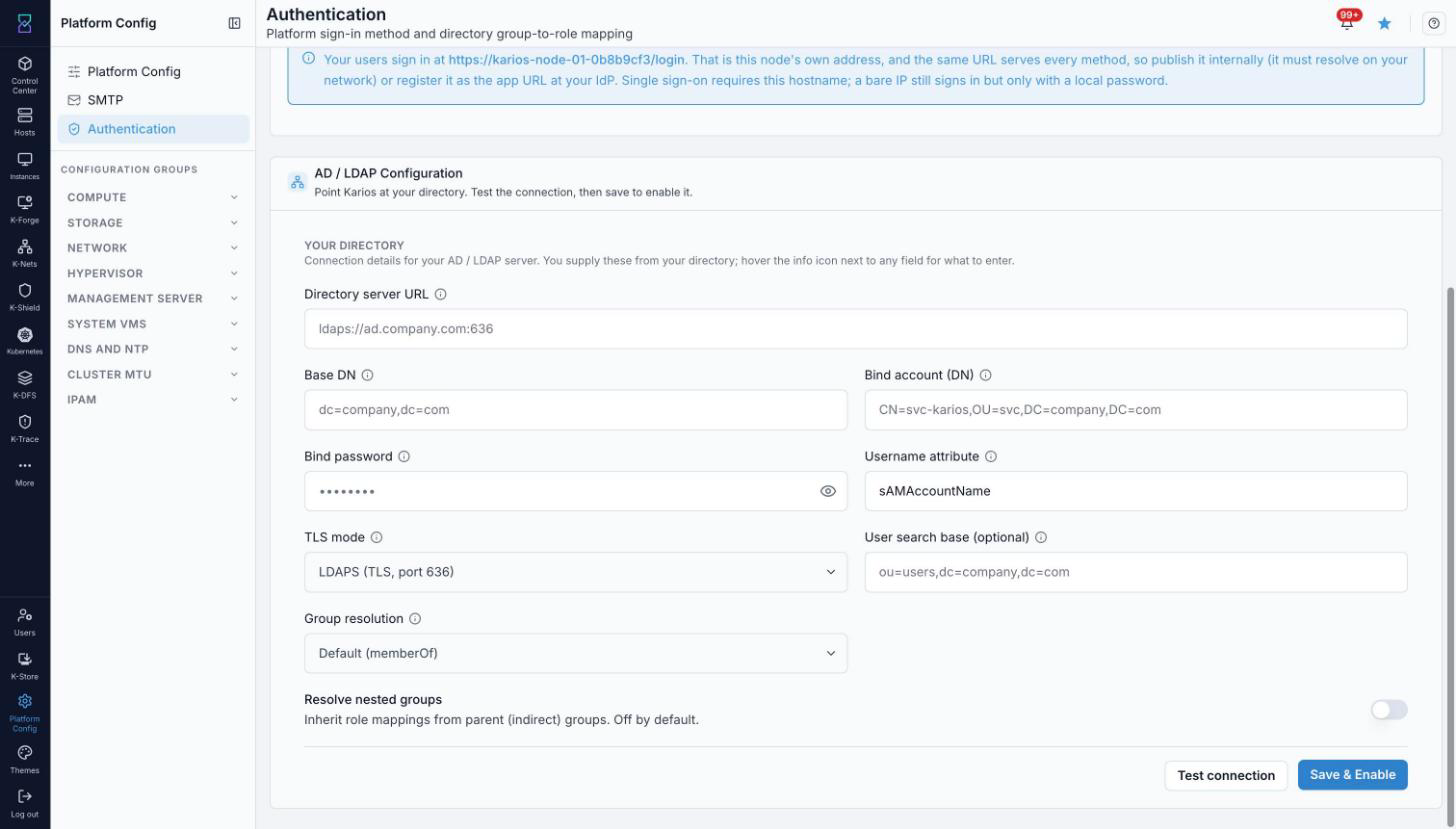
The AD / LDAP configuration form. Fill in the connection details, use Test connection, then Save & Enable.
Field |
What to enter |
|---|---|
Directory server URL |
The directory endpoint, for example |
Base DN |
The root of your directory tree, for example |
Bind account (DN) |
A read-only service account, for example
|
Bind password |
The service account password. Used only to query the directory. |
Username attribute |
The attribute operators log in with, for example |
TLS mode |
How Karios secures the connection (for example |
User search base (optional) |
Narrow the user search, for example |
Group resolution |
How group membership is read. Default is |
Resolve nested groups |
Inherit role mappings from parent (indirect) groups. Off by default. |
Use Test connection to validate the settings, then Save & Enable to make AD / LDAP the active login method.
SAML 2.0 SSO
SAML federates sign-in to an external identity provider such as Okta, Azure AD, or ADFS.
Select SAML 2.0 SSO.
Point Karios at your IdP’s SAML metadata / descriptor URL (for example a Keycloak realm descriptor,
.../realms/<realm>/protocol/saml/descriptor). Use Change source to update it later.Review the configuration, then choose Set as active to make SAML the login method.
Note
Selecting a method only views it. Nothing changes for your operators until you choose Set as active.
OIDC SSO
OIDC federates sign-in to an OpenID Connect provider such as Keycloak, Auth0, or Okta. Configuration has two halves - values Karios generates for you to register in your IdP, and values you copy from your IdP into Karios.
Register in your identity provider
Karios builds these from the node’s address. Copy each into your IdP as an allowed URL - you do not type them.
Value |
Where it goes |
|---|---|
Callback / Redirect URL |
|
Post-Logout Redirect URI |
|
Copy from your identity provider
Look these up in the application you registered for Karios in your IdP.
Field |
What to enter |
|---|---|
Issuer URL |
The provider’s base URL. Karios reads
|
Client ID |
The identifier of the application (client) you registered for Karios. |
Client Secret |
The secret issued alongside the Client ID. Stored encrypted; leave blank to keep the current one. |
Redirect URI |
Pre-filled to the Callback URL above. It must match what you registered in your IdP. |
Scopes |
The OIDC scopes requested at sign-in. |
Save the configuration, then Set as active to make OIDC the login method.
Group to role mapping
Map a directory group (CN) to one or more Karios roles. Operators who belong to a mapped group receive those roles automatically at login. Leave the mapping empty to assign roles manually - new users default to read-only.
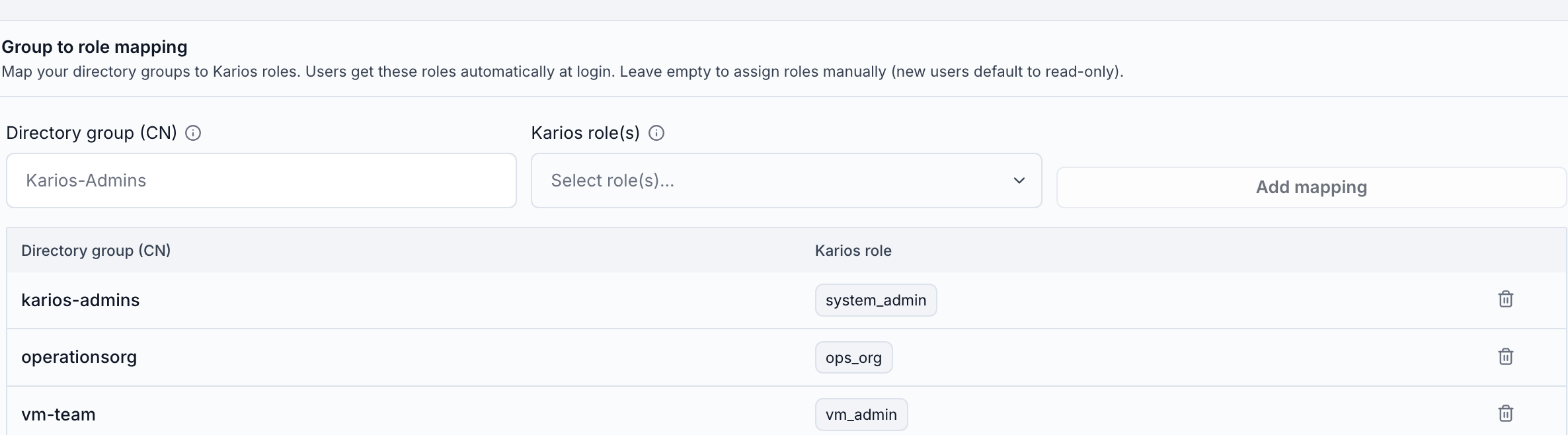
Directory groups mapped to Karios roles. Add a mapping with the group CN and one or more roles, or remove one with the delete icon.
For example:
Directory group (CN) |
Karios role |
|---|---|
|
|
|
|
|
|
The same mapping applies to whichever directory-backed method is active (AD / LDAP, SAML, or OIDC).
Switching the active method safely
Configuring or viewing a method does not change how operators sign in - only Set as active (or Save & Enable for AD / LDAP) does.
Validate an external method before activating it - use Test connection for AD / LDAP, and confirm the sign-in URL resolves for SAML / OIDC.
If an external method ever fails, sign in with a local admin account at the node login URL to recover; local login is always available.
See also
User Management for creating users, defining roles, and assigning access.